> ## Content Index
> Fetch the complete content index at: https://www.angularspace.com/llms.txt
> Use this file to discover other available public pages before exploring further.
# Unified Control State Change Events in Angular 18
- URL: https://www.angularspace.com/unified-control-state-change-events-in-angular-18/
- Published: 2024-06-26T04:00:24.000Z
- Updated: 2024-06-26T04:00:23.000Z
- Author: Grzegorz Dąbrowski
- Tags: Angular 18, Articles
Angular version 18 has introduced a new event emitter called `events`. It offers more control over the data flow, by allowing for tracking precisely which control is a source of changes, and form state giving access to the form submit and reset events.
The `event` field is implemented inside the [AbstractControl](https://angular.dev/api/forms/AbstractControl?tab=description&ref=angularspace.com) class and is available to all classes that inherit from it: [FormControl](https://v17.angular.io/api/forms/FormControl?ref=angularspace.com#description), [FormGroup](https://angular.dev/api/forms/FormGroup?tab=description&ref=angularspace.com), [FormRecord](https://angular.dev/api/forms/FormRecord?tab=description&ref=angularspace.com), and [FormArray](https://angular.dev/api/forms/FormArray?tab=description&ref=angularspace.com).
### Value and state events of a single form control
Let’s check how the `events` field works in practice. The code below presents an example component with one [FormControl](https://v17.angular.io/api/forms/FormControl?ref=angularspace.com#description) object named `nameCtrl`.
```typescript
import { Component, OnInit } from "@angular/core";
import { FormControl, ReactiveFormsModule } from "@angular/forms";
@Component({
selector: "app-form-control-events",
standalone: true,
imports: [ReactiveFormsModule],
template: `
`,
})
export class FormControlEventsComponent implements OnInit {
nameCtrl = new FormControl("");
ngOnInit(): void {
this.nameCtrl.events.subscribe((event) => {
console.log(event);
});
}
}
```
The control is assigned to the `name` [](https://developer.mozilla.org/en-US/docs/Web/HTML/Element/input?ref=angularspace.com) element. There is also a subscription to the `events` field, to log events emitted by the control. Now, let’s type some value into it. Let it be a single character like *'x'*.
What we see in the console is that the event object has emitted three events:
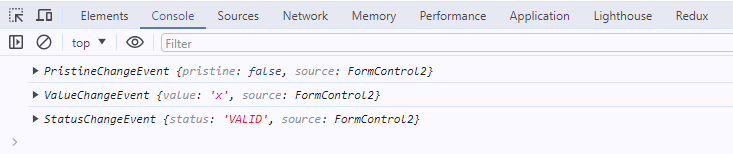
Three? Wait… We’ll see the fourth one when we blur the [](https://developer.mozilla.org/en-US/docs/Web/HTML/Element/input?ref=angularspace.com) element.
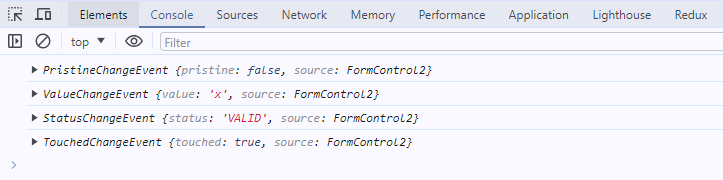
Let's describe each event and describe what it does. Event field emitted four types of events: [ValueChangeEvent](https://angular.dev/api/forms/ValueChangeEvent?ref=angularspace.com), [StatusChangeEvent](https://angular.dev/api/forms/StatusChangeEvent?ref=angularspace.com), [PristineChangeEvent](https://angular.dev/api/forms/PristineChangeEvent?ref=angularspace.com), and [TouchedChangeEvent](https://angular.dev/api/forms/TouchedChangeEvent?ref=angularspace.com). Each of them extends the [ControlEvent](https://angular.dev/api/forms/ControlEvent?ref=angularspace.com) abstract class. All of them contain two fields. First is the `source` field. It points to the object that emitted the event. In our case, events’s source property points to `nameCtrl`. The second field depends on the event type, and contains a value of the control, or value of the control’s state.
Now, regarding the example above:
**ValueChangeEvent** \- similar to (old fashion ;)) [valueChange](https://v17.angular.io/api/forms/AbstractControl?ref=angularspace.com#valueChanges) event. It provides the current value of the control. By default, it is triggered whenever the value of the control has been changed.
**StatusChangeEvent** \- similar to [statusChanges](https://v17.angular.io/api/forms/AbstractControl?ref=angularspace.com#statusChanges). It provides the current validation status. Like [ValueChangeEvent](https://angular.dev/api/forms/ValueChangeEvent?ref=angularspace.com), [StatusChangeEvent](https://angular.dev/api/forms/StatusChangeEvent?ref=angularspace.com) is triggered every time the value of the control has been changed, no matter if the control has assigned validators or not. If the control has an async validator assigned, then [StatusChangeEvent](https://angular.dev/api/forms/StatusChangeEvent?ref=angularspace.com) will be emitted twice. Once, when the status property is set to [PENDING](https://angular.dev/api/forms/FormControlStatus?tab=description&ref=angularspace.com), then for the second time, when the validator returns the result of the validation.
**PristineChangeEvent** \- is triggered when the control value is changed for the first time, regardless of whether the control had an initial value.
**TouchedChangeEvent** \- is triggered when the user interacts with the control for the first time. Usually, it’s triggered when the user blurs the control, even if the value doesn't change.
Since we now know which user actions trigger the event, let’s take a look at how it works with the Reactive Forms API. As we all know, we can change any control's value and status by utilizing methods like [setValue](https://v17.angular.io/api/forms/AbstractControl?ref=angularspace.com#setValue), [disable](https://v17.angular.io/api/forms/AbstractControl?ref=angularspace.com#disable), etc. Using them, we can change the default behavior with options properties like `onlySelf`, `emitEvent`, and so on. Now we can also determine if [ControlEvents](https://angular.dev/api/forms/ControlEvent?ref=angularspace.com) should be emitted or not. Methods like [markAsTouched](https://v17.angular.io/api/forms/AbstractControl?ref=angularspace.com#markAsTouched), [markAllAsTouched](https://v17.angular.io/api/forms/AbstractControl?ref=angularspace.com#markallastouched) (for groups and arrays), [markAsDirty](https://v17.angular.io/api/forms/AbstractControl?ref=angularspace.com#markAsDirty), [markAsPending](https://v17.angular.io/api/forms/AbstractControl?ref=angularspace.com#markaspending), [markAsPristine](https://v17.angular.io/api/forms/AbstractControl?ref=angularspace.com#markaspristine), and [markAsUntouched](https://v17.angular.io/api/forms/AbstractControl?ref=angularspace.com#markasuntouched) can be called with the option’s `emitEvent` property. If those methods are called without it, or `emitEvent` is set to `true`, then the [ControlEvents](https://angular.dev/api/forms/ControlEvent?ref=angularspace.com) will be emitted. Otherwise, they will not. But there is a trick. It does not mean the state of the control will not be changed! It will be. The only difference here is that the event will not be triggered. Just take a look at the code below:
```typescript
const control = new FormControl("Lorem ipsum");
// control.touched -> false
control.markAsTouched({ emitEvent: false });
// control.touched -> true
```
The value of the touched property has been changed anyway.
### Value and state events of a group of controls
So far we have covered [ControlEvents](https://angular.dev/api/forms/ControlEvent?ref=angularspace.com) in terms of [FormControl](https://v17.angular.io/api/forms/FormControl?ref=angularspace.com#description). It’s time to talk about more advanced structures like groups, and arrays. As we all know, all of those classes inherit from AbstractControl. It means all of them will emit [ControlEvents](https://angular.dev/api/forms/ControlEvent?ref=angularspace.com). When it comes to groups and arrays, the [ControlEvents](https://angular.dev/api/forms/ControlEvent?ref=angularspace.com) object reveals its true power. Until version 18 we had access to the newly emitted value or state of the group/array, but we didn’t know which control was the origin of the change. Now, we can take advantage of [ControlEvents](https://angular.dev/api/forms/ControlEvent?ref=angularspace.com) and target a specific control inside the subscription. It’s super useful when we want to react to a particular control change. Let’s dive into an example:
```typescript
import { Component, OnInit } from "@angular/core";
import { FormControl, FormGroup, ReactiveFormsModule } from "@angular/forms";
@Component({
selector: "app-form-group-events",
standalone: true,
imports: [ReactiveFormsModule],
template: ``,
})
export class FormGroupEventsComponent implements OnInit {
form = new FormGroup({
name: new FormControl("John"),
surname: new FormControl("Doe"),
age: new FormControl(30),
});
ngOnInit(): void {
this.form.events.subscribe((event) => {
console.log(event);
});
this.form.get("name")?.setValue("Jane");
}
}
```
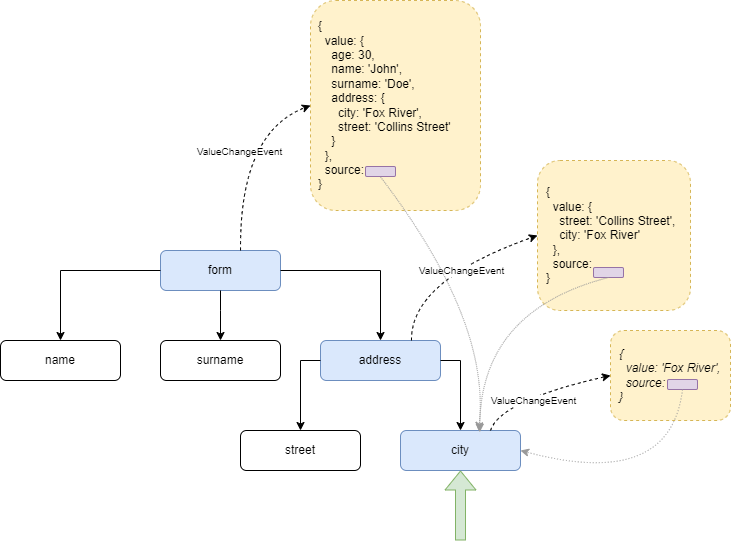
As a result, we’ll get two events emitted: [ValueChangeEvent](https://angular.dev/api/forms/ValueChangeEvent?ref=angularspace.com) and [StatusChangeEvent](https://angular.dev/api/forms/StatusChangeEvent?ref=angularspace.com). Both provide an event object that contains a source field, which points directly to the changed control. The second field depends on the event type, and it can be a value of the control/group or the value of its state. The tricky part is that the source field always points to the control that value/state has been changed. The second field is always related to the object we are subscribing to. It’s even more vivid when we work with more advanced structures.
The example below shows a form with nested [FormGroup](https://angular.dev/api/forms/FormGroup?tab=description&ref=angularspace.com) objects. It also contains four subscriptions: to the form root, to the `address` field, and to the `street` and `city` fields within the `address`.
```diff
import { Component, OnInit } from "@angular/core";
import { FormControl, FormGroup, ReactiveFormsModule } from "@angular/forms";
@Component({
selector: "app-form-group-events",
standalone: true,
imports: [ReactiveFormsModule],
template: ` `,
})
export class FormGroupEventsComponent implements OnInit {
form = new FormGroup({
name: new FormControl("John"),
surname: new FormControl("Doe"),
age: new FormControl(30),
+ address: new FormGroup({
+ street: new FormControl("Collins Street"),
+ city: new FormControl("Fox River"),
+ }),
});
ngOnInit(): void {
this.form.get("address.street")?.events.subscribe((event) => {
console.log(event);
});
+ this.form.get("address.city")?.events.subscribe((event) => {
+ console.log(event);
+ });
+
+ this.form.get("address")?.events.subscribe((event) => {
+ console.log(event);
+ });
+
+ this.form.events.subscribe((event) => {
+ console.log(event);
+ });
}
}
```
Changing the value of the `city` field will trigger events emitter assigned to the `city` field and all its parents (yes, we can prevent this propagation within the `onlySelf` option passed to [setValue](https://v17.angular.io/api/forms/AbstractControl?ref=angularspace.com#setValue) method, but it's not a case here).
The image below shows how [ValueChangeEvent](https://angular.dev/api/forms/ValueChangeEvent?ref=angularspace.com) is propagated through the tree of the form, and what data is put into the event object on each level of the form.
### Submit and reset events
So far we have covered how the events field behaves in terms of a single [FormControl](https://v17.angular.io/api/forms/FormControl?ref=angularspace.com#description) and structures like [FormGroup](https://angular.dev/api/forms/FormGroup?tab=description&ref=angularspace.com) values and states. But that’s not all. Unified Control State Change Events brings long-awaited features, which are submit and reset events. It means no more workarounds, no more submit and reset buttons listeners!
Let’s add this functionality to our example.
```diff
...
@Component({
selector: 'app-form-group-events',
standalone: true,
imports: [ReactiveFormsModule],
template: ``,
})
```
Our form is complete now:
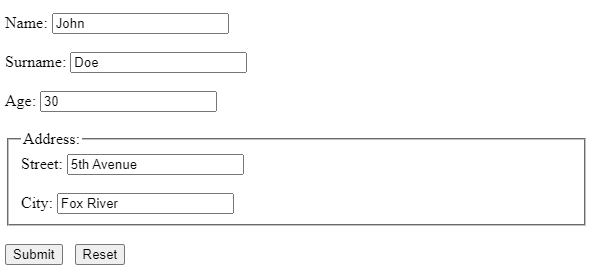
Let’s trigger the submit event by clicking on the Submit button, and see what the console logged. Unlike events, we have been talking about before, [FormSubmittedEvent](https://angular.dev/api/forms/FormSubmittedEvent?ref=angularspace.com) contains **only** source property, which points to the main form object. To be more precise, it points to the object assigned to the `formGroup` directive: `