> ## Content Index
> Fetch the complete content index at: https://www.angularspace.com/llms.txt
> Use this file to discover other available public pages before exploring further.
# afterRenderEffect, afterNextRender, afterEveryRender & Renderer2
- URL: https://www.angularspace.com/afterrendereffect-afternextrender-aftereveryrender-renderer2/
- Published: 2025-09-16T11:29:19.000Z
- Updated: 2025-09-16T11:29:46.000Z
- Author: Eduard Krivanek
- Tags: Articles
Recently I’ve been playing around with some Angular functionalities, which are: `effect`, `afterRenderEffect`, `afterNextRender`, `afterEveryRender` and `Renderer2`. You don’t see them used much compared to signals or computed. Maybe only `effect` is more common, however how and when to use the rest?
I wanted to write about them because I kept mixing them up myself, therefore this post is as much for me as for anyone else. I want to touch on each of them, look at some examples, how they differ, and also check how they behave with SSR.
## Using `effect`
[The effect()](https://angular.dev/guide/signals?ref=angularspace.com#reading-without-tracking-dependencies) will run at least once and then every time the dependency signal (or multiple one) changes. A shameless plug to my [Senior Angular Interview Questions](https://www.angularspace.com/senior-angular-interview-questions/), I talked about the diamond problem in RxJS and how it’s not present in signals. Meaning if you have an effect with multiple signal dependencies and you update those signal, one after another, then the `effect` will still run only once, since signals are synchronous compared to Observables which are asynchronous and the logic could be re-executed multiple times, causing side-effects.
Use `effect` when you want to bridge the gap between a reactive state (signals) and a non-reactive execution. Use cases which you hear many times are mainly DOM updates, logging, or even executing a `fetch()` API call to the server. Other less common examples may be for example local storage updates, analytics tracking, chart data updates or setting loading state.
```typescript
// state of the used theme
readonly theme = signal<'light' | 'dark'>('light');
// track what page we are on
readonly currentPage = signal('home');
// data to render a chart
readonly chartData = signal([1, 2, 3]);
// loading state of the app
readonly loading = signal(false);
constructor() {
effect(() => {
// change theme & save it
document.body.dataset.theme = this.theme();
localStorage.setItem('theme', this.theme());
});
effect(() => {
// sends data to a 3rd party
analytics.trackPage(this.currentPage());
});
effect(() => {
// updates values in the chart
updateChart(this.chartData());
});
effect(() => {
// dependency to listen to
const chartData = this.chartData();
untracked(() => {
this.loading.set(true);
})
})
}
```
When it comes to SSR, you have to be a bit careful with `effect()`. It also runs on the server, at least once (even if dependencies are `undefined`), and then all the time when its dependencies change. An empty effect is also executed: `effect(() => console.log('Empty effect'));`
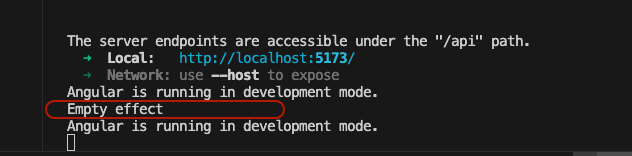
Empty Effect Execution
In SSR you don’t actually have a browser, so there’s no `window`, `document`, or localStorage. If you drop DOM calls or browser APIs directly into an effect, it’ll throw during the server render. The trick is to only use `effect()` on the server for things that are safe in a Node environment. Anything that touches the DOM should be wrapped in something like `isPlatformBrowser` or pushed into `afterRenderEffect`, which runs only in the browser after Angular has finished painting.
Another point worth highlighting is cleanup function - [EffectCleanupRegisterFn](https://angular.dev/api/core/EffectCleanupFn?ref=angularspace.com). Just like in RxJS where you unsubscribe from a stream, `effect()` also gives you a way to tear things down when the effect is destroyed. This is helpful when wiring up elements like event listeners, intervals, or external libraries that require explicit cleanup.
It's the first available argument in the `effect()` function. There is no naming convention, it will work with any name, but most developers call it `onCleanup()`. Use it inside your effect to make sure you don’t leak memory or leave hanging listeners when the component goes away. It’s easy to forget, but in larger apps, this can save you from nasty performance issues.
```typescript
@Component({
selector: 'app-resize-listener',
template: `
Window width: {{ width() }}
`
})
export class ResizeListenerComponent {
// reactive signal that stores the current width
readonly width = signal(window.innerWidth);
constructor() {
effect((onCleanup) => {
const updateWidth = () => this.width.set(window.innerWidth);
window.addEventListener('resize', updateWidth);
// cleanup when effect is destroyed
onCleanup(() => {
window.removeEventListener('resize', updateWidth);
});
});
}
}
```
## Using `afterRenderEffect`
The `afterRenderEffect` is more preferable for DOM updates, browser APIs, or integrations that don’t make sense on the server (like canvas drawing, chart rendering, or measuring element sizes). It is executed after Angular has painted the view in the browser. From the first examples, you could say that updating data in charts is better suited for the `afterRenderEffect` since we are performing a DOM update.
When you open up the [documentation](https://angular.dev/api/core/afterRenderEffect?ref=angularspace.com) for this function, Angular team highlights that “*You should prefer specifying an explicit phase for the effect instead, or you risk significant performance degradation.*”
In real life, you may have an example of displaying a PDF file to an user and you want to track (in percentage) how far he has scrolled in the document. One of the (many) ways how to achieve this behavior is the following:
```typescript
@Component({
selector: 'app-root',
template: `
`,
})
export class App {
readonly divRef = viewChild>('divRef');
readonly divTop = viewChild>('divTop');
readonly scrollPercentage = toSignal(
toObservable(this.divRef).pipe(
filter((el) => !!el),
switchMap((el) =>
fromEvent(el.nativeElement, 'scroll').pipe(
map(() => {
const scrollHeight = divRef.nativeElement.scrollHeight ?? 1;
const clientHeight = divRef.nativeElement.clientHeight ?? 1;
const scrollTop = divRef.nativeElement.scrollTop ?? 0;
const scrolled = Math.round(
(scrollTop / (scrollHeight - clientHeight)) * 100
);
return scrolled;
})
)
)
),
{ initialValue: 0 }
);
constructor() {
afterRenderEffect({
// creating dependency on the scroll signal
earlyRead: () => this.scrollPercentage(),
// write to DOM every time scrollPercentage emits
write: (val, cleanUp) => {
const divTop = this.divTop();
if (!divTop) {
return;
}
divTop.nativeElement.innerText = `Scroll: ${val()}%`;
},
});
}
}
```
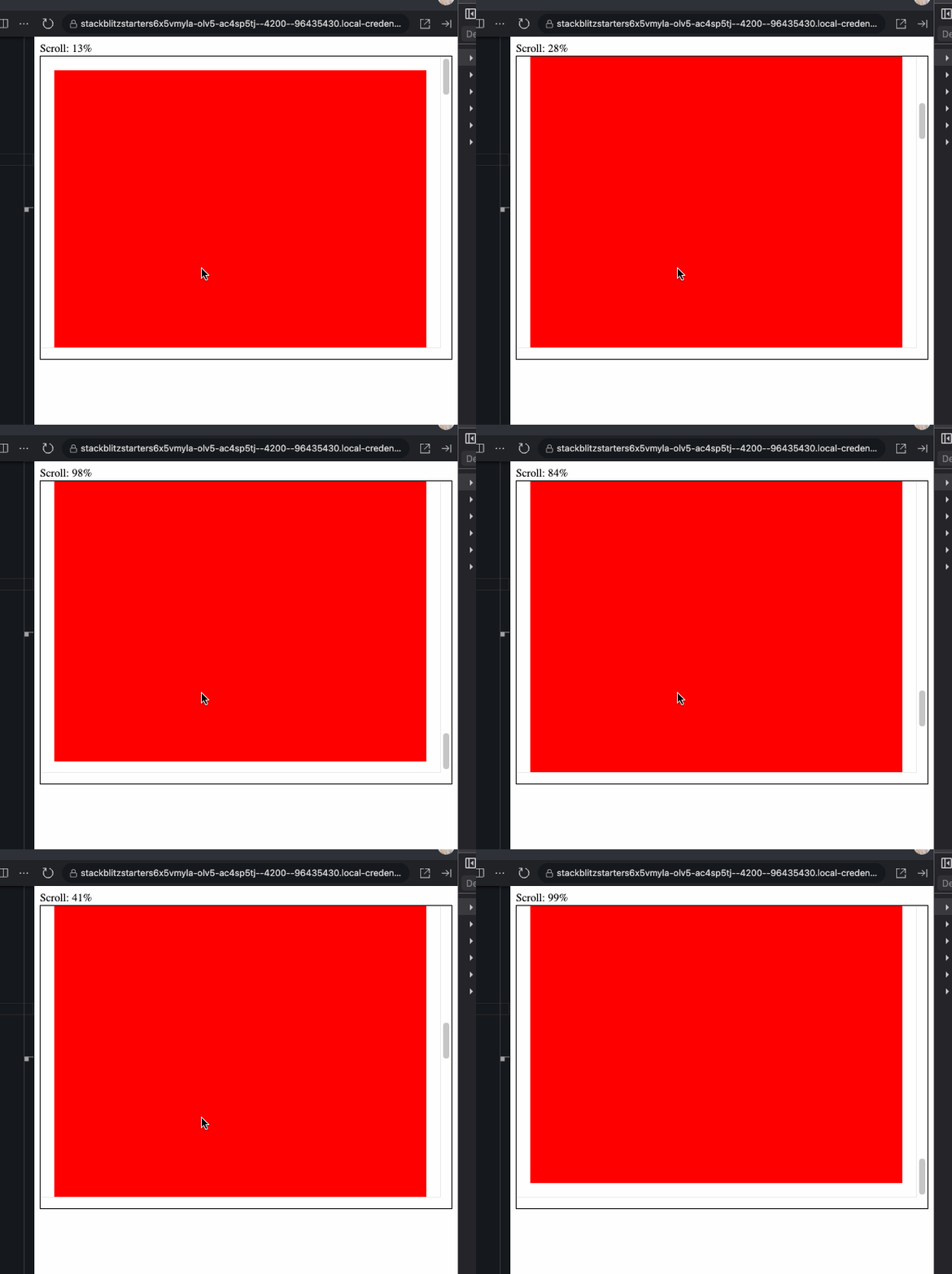
Scroll Attached Using afterRenderEffect
In the above example, the `afterRenderEffect` is triggered once the browser finishes painting the DOM element. It then uses the `earlyRead` callback to register the `scrollPercentage` signal dependency. Every time `scrollPercentage` emits (as you scroll), the `write` phase is triggered to update the DOM.
Of course you can achieve this exact result without using the `afterRenderEffect` and just directly interpolating the `scrollPercentage` signal in the HTML (`{{ scrollPercentage() }}`).
The documentation about `afterRenderEffect` also talks about the `read` optionality, so what’s the difference?
- Use `earlyRead` when you want to read the DOM before any writes happen. Angular runs the `earlyRead` callback first, so you can grab measurements (width, height, etc.), before any DOM updates, and pass that information to the `write` phase.
- Use `read` when Angular has applied all styles in the `write` phase, as this one runs after it. It’s good when you want to read some correct measurements after all UI changes, but you can not pass those values back to the `write` phase. Only `earlyRead` allows passing values to the `write` operation.
You also have the option to use the `mixedReadWrite` phase, which allows you to read and subsequently write data to the DOM; however, Angular recommends avoiding it and using the previously described ones. The phase order:
1. `earlyRead`
2. `write`
3. `mixedReadWrite`
4. `read`.
One other great resource I’ve found is from Code Shots With Profanis - [Get to Know the AfterRenderEffect hook in Angular](https://www.youtube.com/watch?v=W7iOgNthNW8&ref=angularspace.com). I do recommend checking out his explanation on this topic.
From my understanding, when you only use client-side rendering and you ignore the phases in `afterRenderEffect`, then it behaves the same as `effect`. My above example with the scroll can also be achieved by the following:
```typescript
constructor() {
// example 1
afterRenderEffect(() => {
const val = this.scrollPercentage();
const divTop = this.divTop();
divTop.nativeElement.innerText = `Scroll: ${val}%`;
});
// example 2
effect(() => {
const val = this.scrollPercentage();
const divTop = this.divTop();
divTop.nativeElement.innerText = `Scroll: ${val}%`;
});
}
```
> ***NOTE:*** However, not utilizing the rendering phases, you are risking layout thrashing. It happens when the browser is forced to repeatedly recalculate the layout, because your code is reading from and writing to the DOM in an uncoordinated way, creating a so called loop. By separating earlyRead (all reads) from write (all writes), Angular batches DOM reads before any writes happen. This avoids any unexpected looping behavior.
## Using `afterNextRender` and `afterEveryRender`
The [documentation](https://angular.dev/guide/components/lifecycle?ref=angularspace.com#aftereveryrender-and-afternextrender) about these two function says that: “*we can register a render callback to be invoked after Angular has finished rendering all components on the page into the DOM.*”. The idea is the following:
- `afterNextRender` runs only once after Angular paints the view for the first time
- `afterEveryRender` runs after every render cycle, like a subscription to render events
If we were to compare these two functions to a life cycle hook, the closest (in behavior) we would get is `afterNextRender` to `ngAfterViewInit` and `afterEveryRender` to `ngAfterViewChecked`, as `afterEveryRender` runs every time a `tick()` re-renders something dirty. Compared to life cycle hooks, `afterNextRender` and `afterEveryRender` only run on the client side, whereas life cycle hooks are also triggered on SSR.
The other difference is that the hooks are scoped at the component level, while afterNextRender and afterEveryRender are scoped to the rendering of the whole app (the page we are looking at). Angular’s team also provides a simple diagram to better understand the execution order.
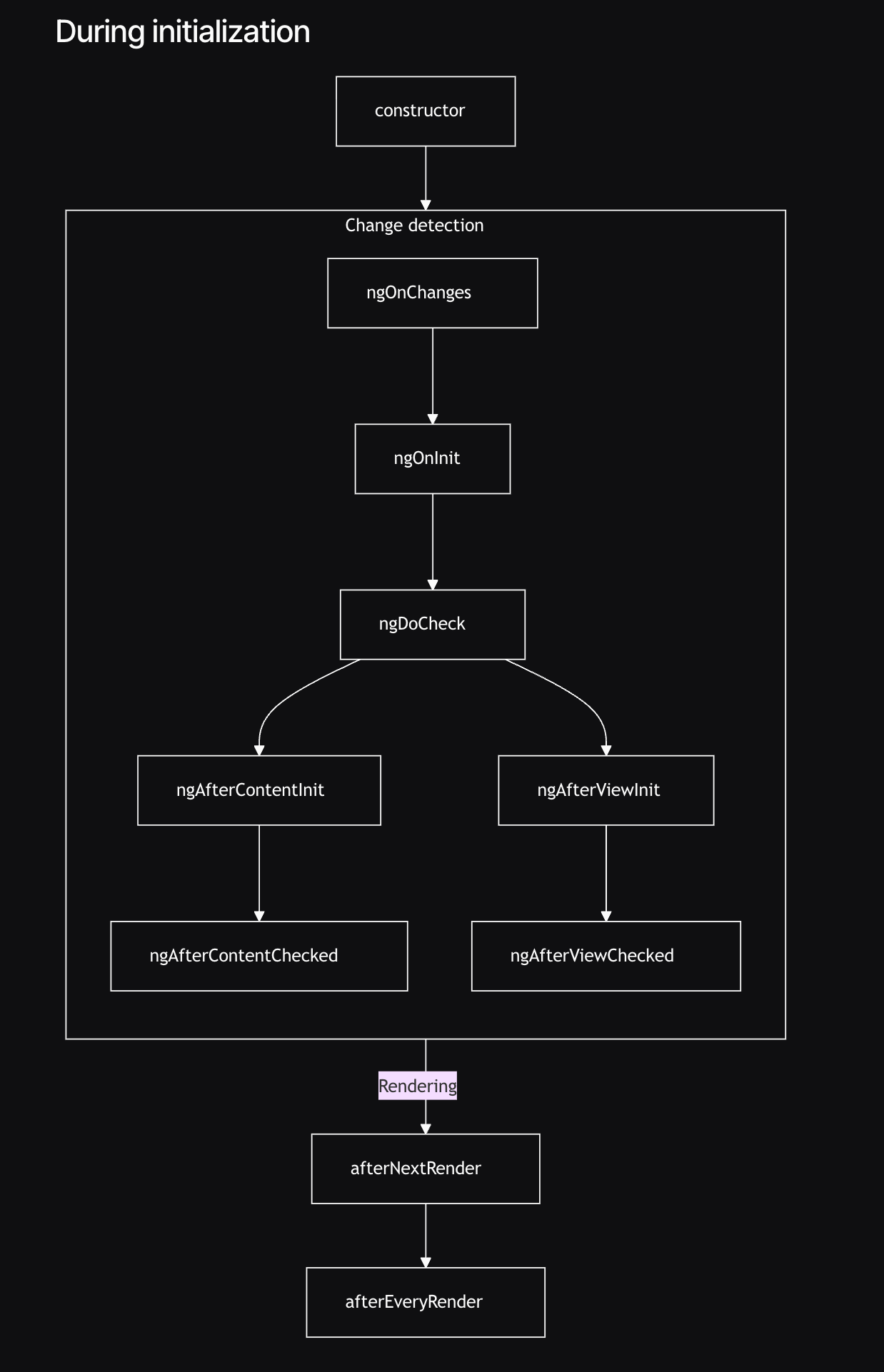
Angular Initialization
Understanding `afterNextRender` is a bit simpler, since it is executed only once, after DOM has been painted. You can put logic from `ngOnInit` into it, as `afterNextRender` is called inside the `constructor`. You can render data into charts once, or focus on an empty input element:
```typescript
@Component({
selector: 'app-root',
template: `
`,
})
export class App {
readonly inputs = viewChildren>('input');
constructor() {
afterNextRender(() => {
const inputs = this.inputs();
const firstEmpty = inputs.find((d) => d.nativeElement.value == '');
// this will focus on the 'second' input
firstEmpty?.nativeElement?.focus();
});
}
}
```

Empty Input Focus
Using `afterEveryRender` is, at least for my understanding, used for less common use cases. The question is: when do we actually need to execute some code after every rendering cycle? One example is the' onStable' method of [ZoneJS](https://angular.dev/api/core/NgZone?ref=angularspace.com). The `onStable` method is triggered every time a change detection occurs, and as we move toward zoneless applications, you can copy `onStable` logic into `afterEveryRender`, which will result in the same behavior. See the following code and GIF for a demonstration.
```typescript
@Component({
selector: 'app-resize-listener',
standalone: true,
template: `
Text: {{ text() }}
`,
})
export class ResizeListenerComponent {
private readonly ngZone = inject(NgZone);
readonly text = signal('');
constructor() {
this.ngZone.onStable
.asObservable()
.subscribe((e) => console.log('ZoneJs - triggered'));
afterEveryRender(() => {
console.log('afterEveryRender - triggered');
});
}
onClick1() {}
onClick2() {
this.text.update((prev) => `${prev}K`);
}
}
```
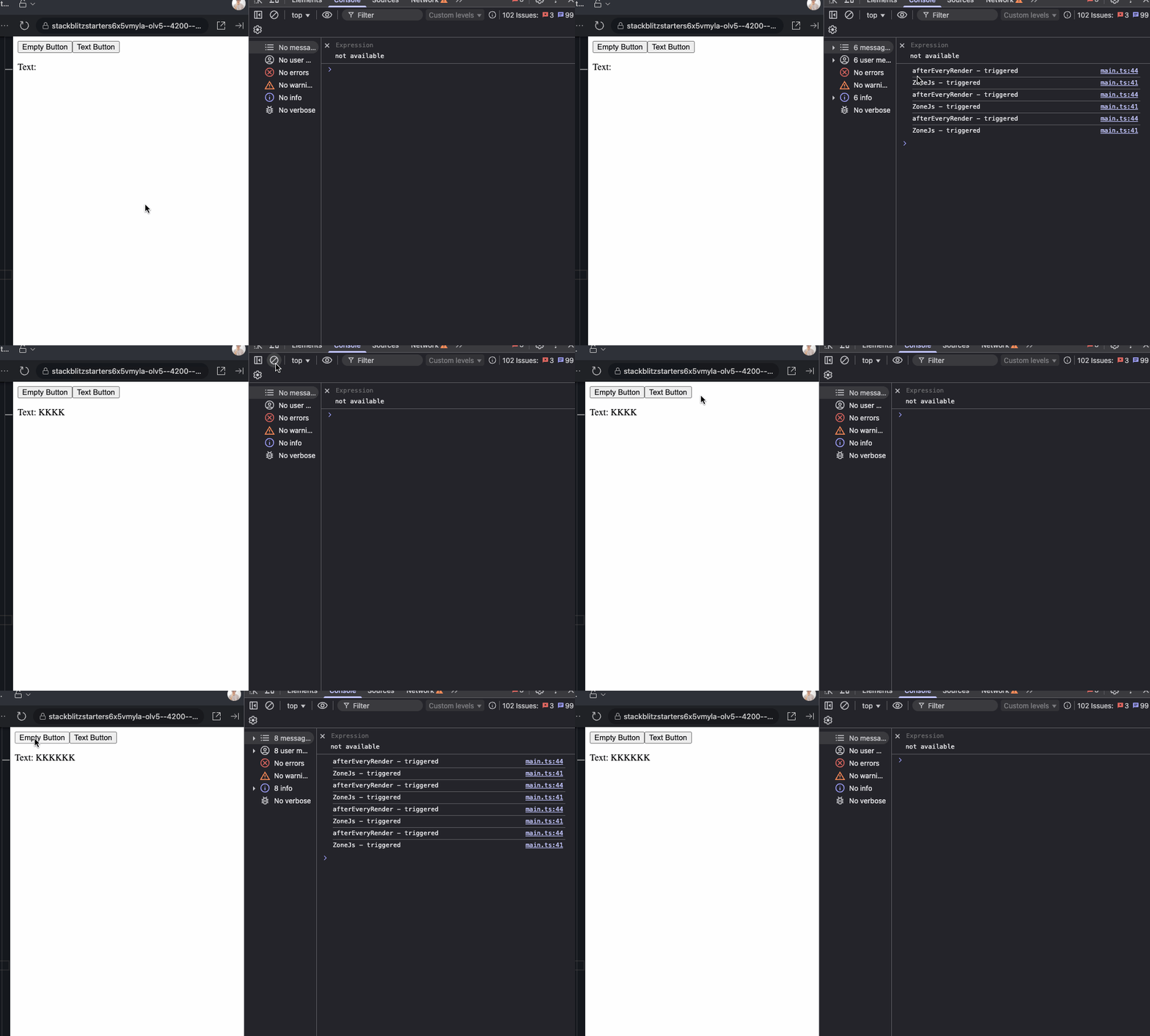
NgZone vs AfterEveryRender
In theory I could rewrite my first example with scroll value from Observables into `afterEveryRender` and it would work the same way:
```typescript
@Component({
selector: 'app-root',
template: `
`,
})
export class App {
readonly divTop = viewChild>('divTop');
readonly divRef = viewChild>('divRef');
constructor() {
afterEveryRender({
earlyRead: () => ({
divRef: this.divRef(),
divTop: this.divTop(),
}),
write: (elements) => {
const { divRef, divTop } = elements;
if (!divTop || !divRef) {
return;
}
const scrollHeight = divRef.nativeElement.scrollHeight ?? 1;
const clientHeight = divRef.nativeElement.clientHeight ?? 1;
const scrollTop = divRef.nativeElement.scrollTop ?? 0;
const scrolled = Math.round(
(scrollTop / (scrollHeight - clientHeight)) * 100
);
divTop.nativeElement.innerText = `Scroll: ${scrolled}%`;
},
});
}
}
```
One question I was wondering about is whether to use `afterEveryRender` or maybe reach out to `Renderer2` and apply listeners? The example with scroll percentage could be adjusted to use `Renderer2` as follows:
```typescript
@Component({
selector: 'app-scroll-tracker',
standalone: true,
template: `
Scroll: {{ scrollPercent() }}%
`,
})
export class ScrollTrackerComponent {
private readonly renderer = inject(Renderer2);
private readonly destroyRef = inject(DestroyRef);
readonly divRef = viewChild>('divRef');
readonly scrollPercent = signal(0);
// reference to the listener to destroy it with the component
private removeListener?: () => void;
constructor() {
afterNextRender({
earlyRead: () => this.divRef()?.nativeElement,
write: (box) => {
if (!box) {
return;
}
this.removeListener = this.renderer.listen(box, 'scroll', () => {
const percent = Math.round(
(box.scrollTop / (box.scrollHeight - box.clientHeight)) * 100
);
this.scrollPercent.set(percent);
});
},
});
// destroy listener with the component
this.destroyRef.onDestroy(() => {
this.removeListener?.();
});
}
}
```
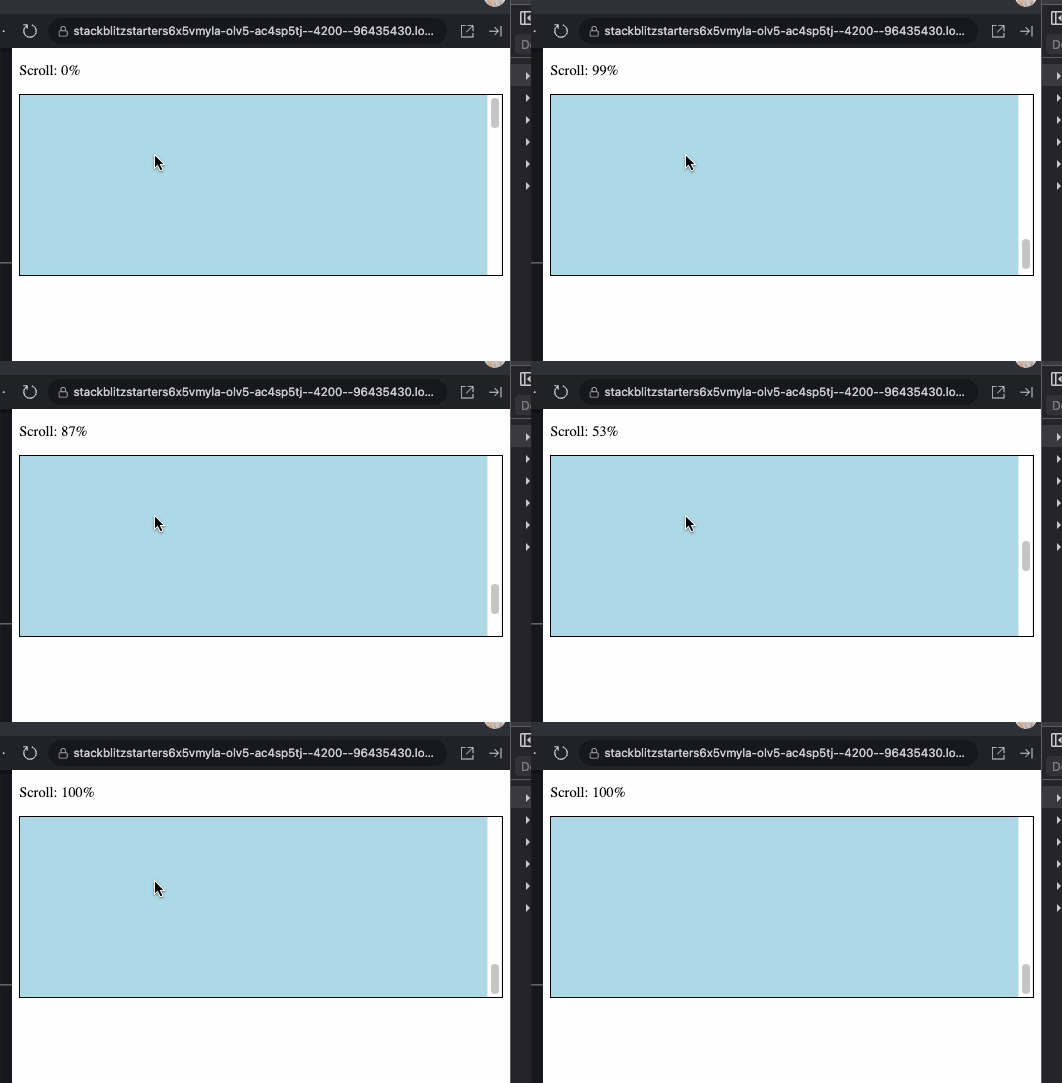
Scroll Counter Attached Using Renderer2
Seems like there is always more than one solution for a problem. My understanding on the difference between these two is that:
- `Renderer2` is used when we want to attach some listeners or render on the DOM
- `afterEveryRender` is used when we want to fire a callback once DOM painting is done
When is comes to the scroll example, the `Renderer` example makes more sense, since we track the scroll position (an event based behavior), however if we were want to scroll to the bottom of the page every time a new information is presented on the screen, in that case, `afterEveryRender` would be a more preferable option.
## Summary
All in all, these tools don’t replace each other, but complement different needs. If your logic is purely reactive state, reach for `effect`. If it depends on the DOM, use `afterRenderEffect`. For one-time DOM adjustments after the first paint, use `afterNextRender`. If your logic needs to be executed on every DOM re-render, use `afterEveryRender`. Finally, `Renderer2` is a universal way to attach listeners and manipulate the DOM without risking SSR crashes.
Hope you liked the article and I was able to provide some explanation on these functions. They were causing some confusion. at least for me, hence I decided to go deeper with them and try to explain them with my own words. Feel free to share your thoughts, catch more of my articles on [dev.to](https://dev.to/krivanek06?ref=angularspace.com), connect with me on [LinkedIn](https://www.linkedin.com/in/eduard-krivanek?ref=angularspace.com) or check my [Personal Website](https://eduardkrivanek.com/?ref=angularspace.com).
---